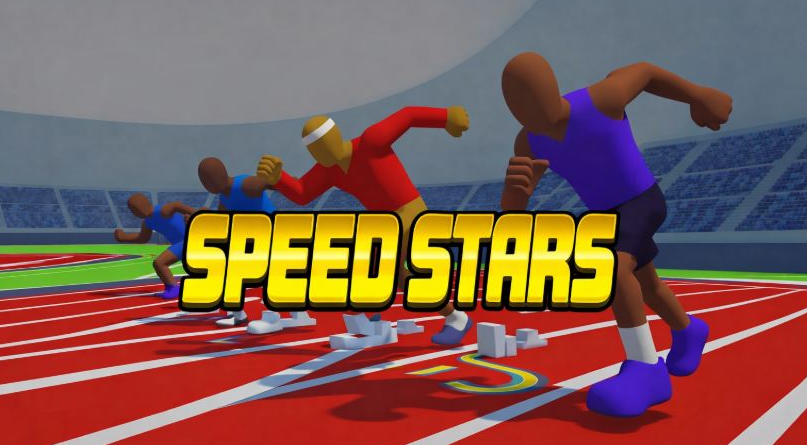
Speed Stars Review: A Rhythm Game Disguised as a Track Meet
I approached Speed Stars as someone who plays rhythm games, not sports games. Track statistics mean very little to me, and I couldn’t tell you what counts as a respectable 400m time without quietly searching for the answer first. What I do understand is timing. Give me a steady beat, two controls, and a score to improve, and I’ll happily lose an evening.
That’s why Speed Stars made sense almost immediately.
The game looks like a compact track and field simulator. Athletes line up in their lanes, wait for the signal, and race toward the finish while a timer records every fraction of a second. Underneath that presentation, though, Speed Stars behaves like a demanding rhythm game. You move the runner by alternating two inputs, and the quality of that pattern determines how efficiently the athlete accelerates.
You don’t hold a button to run. You perform the run.
When your timing works, the athlete moves with a smooth, convincing stride. When it doesn’t, the animation becomes awkward and the other runners pull away. It feels less like controlling a character from the outside and more like keeping a delicate machine in rhythm.
Honestly, I didn’t expect two buttons to demand this much concentration.
The Beat Is More Important Than Raw Speed
Speed Stars was created by Luke Doukakis and released on PC before expanding to mobile platforms. The official Steam edition describes it as a rhythm-based running game where timing, pacing, and composure decide the result. That description is accurate.
Each press represents part of the athlete’s stride. Your job is to alternate the inputs evenly while gradually increasing the tempo. Pressing both controls in a messy rush won’t create a faster runner. It breaks the cadence.
Rhythm-game players will recognize the feeling. A difficult music chart doesn’t become easier because you attack every note with maximum force. You need to understand the tempo, anticipate what comes next, and stay relaxed enough to remain accurate.
New players should listen to their hands. The alternating taps create an audible pattern even if you play without music. Try to produce an even left-right-left-right beat. If one hand begins dominating, slow down slightly and rebuild the pattern.
This may feel cautious during a sprint, but control creates speed. Frantic inputs only create the appearance of effort.
Finding the Right Tempo
The perfect cadence isn’t identical throughout a race. Your runner begins from a stationary position and needs to accelerate before reaching full speed.
Start with clear, deliberate alternation. Increase the tempo as the athlete settles into the stride. Jumping immediately to your fastest possible tapping rate can cause the character’s movement to become unstable.
I think of the opening like beginning a song. If the first few notes establish the wrong tempo, the entire performance becomes harder to recover. A clean start gives you a pattern you can maintain.
Once you reach the middle of a short sprint, focus on consistency. Don’t change your rhythm simply because another athlete moves ahead. The visual pressure of nearby competitors can make you tap faster than you can control.
This happened to me constantly. I would establish a good pattern, notice an opponent half a step ahead, and immediately ruin everything by chasing them with wild inputs. The runner didn’t accelerate. My fingers simply became louder.
Watch your own athlete and trust the cadence. You can study the competition after the finish.
Which Race Should Beginners Play?
The 100m dash offers the clearest introduction to Speed Stars. It’s long enough to practice acceleration and top-speed rhythm but short enough that a failed run doesn’t feel like a major investment.
The Steam version includes four sprint distances: 60m, 100m, 200m, and 400m. Other editions can include hurdle events, with availability depending on the platform and whether you have access to the full version.
The 60m event puts enormous emphasis on reaction and acceleration. There’s barely enough time to recover if the opening rhythm goes wrong. I’d leave it until you’re comfortable with the basic controls.
The 200m provides more time to settle into a cadence, although maintaining composure becomes harder. The 400m introduces a stronger pacing element because maximum intensity isn’t always sustainable from beginning to end.
For a new player, I’d suggest this order: learn the controls in the 100m, practice quick acceleration in the 60m, then explore the longer events. You don’t need to master one distance before touching another, but the 100m teaches the central idea with the fewest distractions.
Longer Events Change the Music
A short sprint resembles a fast song that demands accuracy for a brief burst. The 400m feels more like a track with changing intensity. You need a tempo that preserves enough energy and control for the final section.
If you begin too aggressively, the athlete may lose speed later. A slightly calmer opening can produce a stronger overall result, even if nearby runners initially move ahead.
Returning players should experiment with pacing rather than repeating one rhythm over every distance. Record several attempts with different approaches. Try a conservative opening followed by a faster finish, then compare it with an aggressive start.
Your intuition may be wrong. An attempt that feels dramatic and fast can produce a worse time than a smooth run where nothing seemed particularly exciting.
That’s another similarity to music games. The clean performance often looks effortless. The messy one feels busy.
Hurdles add a more complicated rhythm by forcing you to coordinate each clearance with the running pattern. The obstacle isn’t separate from your cadence; it becomes part of it. Once you learn the spacing, a successful hurdle race develops its own repeating structure.
Ghosts Provide the Best Feedback
Speed Stars includes races against your personal-best ghost, computer opponents, and recorded performances from other players. You can combine ghosts and AI runners to build a fuller field.
I like the personal ghost because it behaves like a metronome created from your own best attempt. It shows whether you’re ahead or behind and, more importantly, where the difference appears.
If the ghost gains ground at the start, your reaction or early cadence needs work. If it moves away during the middle, your rhythm is less consistent. If you close the gap near the finish but still lose, you may be pacing too cautiously.
Don’t spend the whole race staring sideways at it. That’s like watching another player’s hands during a rhythm game and forgetting your own chart. Focus on your inputs, then analyze the ghost or replay afterward.
Replays let you review a run from different camera angles. They aren’t just decorative. Watch the athlete’s stride and look for the moment it becomes uneven. A tiny mistake may explain the fraction of a second separating your current attempt from a personal best.
Character Choices and Presentation
You can customize runners and unlock additional characters, with options for clothing, colors, body types, and other appearance details. Characters may also have slight gameplay differences, so one athlete’s timing can feel more comfortable than another’s.
Regular players should test several runners across different events. A character that feels excellent during the 60m may not match your preferred rhythm in the 400m. Choose based on repeated results rather than one lucky race.
The game also offers adjustable stadium themes, music, controls, and camera views, depending on the platform. I particularly appreciate the music options because the soundtrack can influence how I tap. If a song’s beat fights against my intended cadence, I switch tracks or play with reduced music.
That may sound overly sensitive. Rhythm players know exactly what I mean.
The Downsides of Such a Focused Game
Speed Stars revolves around repetition. You run the same distances while trying to improve by increasingly small amounts. Players who need a story campaign, constant new environments, or elaborate rewards may find the structure thin.
The controls can also be physically tiring. Rapid tapping for repeated races puts strain on your fingers and wrists, especially if you tense your hands. Take breaks and use a comfortable control layout. Pressing harder doesn’t improve the result.
Beginners may struggle to understand why one attempt was slower than another. The animation and replay provide clues, but a detailed cadence tutorial or input-timing graph would make improvement easier.
Content also varies among PC, mobile, and browser versions. Some events and customization features may require the full game, so check what your chosen version includes.
Final Speed Stars Review
Speed Stars is an excellent sports game for people who enjoy rhythm, repetition, and measurable improvement. Its two-input control scheme looks simple, yet it produces a surprisingly deep challenge based on acceleration, timing, pacing, and composure.
New players should build an even cadence before increasing speed. Experienced runners can compare ghost performances, develop different rhythms for each event, study replays, and compete for better leaderboard positions.
I arrived expecting a track game and stayed because Speed Stars gives me the same feeling as replaying a difficult song for a higher score. You know the pattern. You can feel where the mistakes happen. The next clean attempt always seems one restart away.
Then you improve by 0.01 seconds.
Well, now you have to try again.